INFRA0by Synergech
Get started
Multi-cloud agent · i0 Max

What do you want to build?

Describe your infrastructure in plain English. INFRA0 turns your idea into production-ready cloud infrastructure.

Inside Infra0

Introducing Infra0

Click through projects, templates, and a real Terraform workspace exactly as your team would inside Infra0. Every panel below is interactive; nothing here touches real infrastructure.

AI
Acme Inc.
Workspace

What do you want to build?

AI
Acme Inc.
Workspace

Cloud Provider Credentials

Credentials used to deploy Terraform from your workspaces.

NameProviderDescriptionCreatedLast UpdatedLast UsedActions
Production AWS — Acme CoreAWSPrimary production account · us-east-115 Aug 20253 Sep 202512m ago
Staging Azure — Acme CoreAzureStaging subscription for portal & billing2 Sep 20252 Sep 20252h ago
Fleet Telemetry — GCPGCPfleet-telemetry-prod-382120 Sep 202514 Jan 202634m ago
DR AWS — us-west-2AWSSecondary region for disaster recovery4 Oct 20254 Oct 20256 days ago
Analytics AzureAzureData analytics & ML workloads11 Nov 202511 Nov 202519 days ago
Legacy ERP — AzureAzureScoped to legacy-erp-migration only3 Dec 20253 Dec 2025Never

Showing 6 of 6 credentials

AI
Acme Inc.
Workspace
EC2 Instance-14/Provision an EC2 instance i...
/provision-an-ec2-instance-in-aws
Provision an EC2 instance in AWS

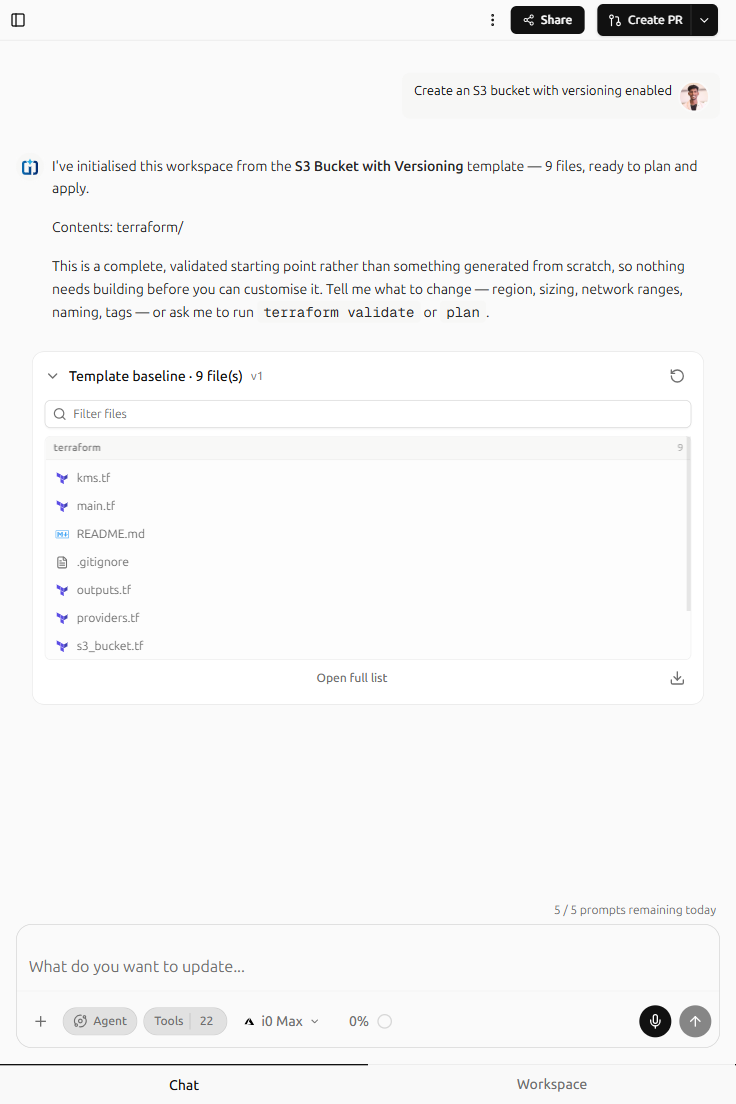
I’ve initialised this workspace from the EC2 Instance-14 template — 9 files, ready to plan and apply.

Contents: terraform/

This is a complete, validated starting point rather than something generated from scratch, so nothing needs building before you can customise it. Tell me what to change — region, sizing, network ranges, naming, tags — or ask me to run terraform validate or plan.

Template baseline · 9 file(s)v1
Agent Tools 22
Unlimited prompts · 2M token budget/mo
Explorer
terraform
ec2_instance.tf
1/**
2 * The instance, its security group, and an instance profile granting Session
3 * Manager access — so there is no need for an SSH key or an open port 22.
4 */
5
6resource "aws_security_group" "web" {
7 name_prefix = "${local.name_prefix}-web-"
8 description = "Inbound web traffic to the instance"
9 vpc_id = aws_vpc.main.id
10
11 lifecycle {
12 create_before_destroy = true
13 }
14
15 tags = merge(local.common_tags, { Name = "${local.name_prefix}-web-sg" })
16}
17
18resource "aws_vpc_security_group_ingress_rule" "web_http" {
19 security_group_id = aws_security_group.web.id
20 description = "HTTP from the allowed range"
21
22 cidr_ipv4 = var.ingress_cidr
23 ip_protocol = "tcp"
24 from_port = var.app_port
25 to_port = var.app_port
26}
27
28resource "aws_vpc_security_group_egress_rule" "web_egress" {
29 security_group_id = aws_security_group.web.id
30 description = "Outbound for patching and AWS APIs"
31
32 cidr_ipv4 = "0.0.0.0/0"
33 ip_protocol = "-1"
34}
35
36# — Instance identity ——————————————————————————————
37
38data "aws_iam_policy_document" "assume_role" {
39 statement {
40 effect = "Allow"
41 actions = ["sts:AssumeRole"]
42 principals {
43 type = "Service"
44 identifiers = ["ec2.amazonaws.com"]
45 }
46 }
47}
48
49resource "aws_iam_role" "instance" {
50 name_prefix = "${local.name_prefix}-ec2-"
51 assume_role_policy = data.aws_iam_policy_document.assume_role.json
52 tags = local.common_tags
53}
54
55resource "aws_iam_role_policy_attachment" "ssm" {
56 role = aws_iam_role.instance.name
57 policy_arn = "arn:aws:iam::aws:policy/AmazonSSMManagedInstanceCore"
58}
59
60resource "aws_iam_instance_profile" "instance" {
61 name_prefix = "${local.name_prefix}-ec2-"
62 role = aws_iam_role.instance.name
63}
64
65resource "aws_instance" "web" {
66 ami = data.aws_ami.al2023.id
67 instance_type = var.instance_type
68 subnet_id = aws_subnet.public.id
69 vpc_security_group_ids = [aws_security_group.web.id]
70 iam_instance_profile = aws_iam_instance_profile.instance.name
71
72 tags = merge(local.common_tags, { Name = "${local.name_prefix}-web" })
73}

Integrates with the tools you already use

Integrations, not endorsements.

  • Terraform
  • Amazon Web Services
  • Microsoft Azure
  • Google Cloud
  • Kubernetes
  • Docker
  • Helm
  • Prometheus
  • Grafana
  • Datadog
  • GitHub
  • GitLab
  • Git
  • Ansible
  • Pulumi
  • OpenTofu
  • Jira
  • Jenkins
  • CircleCI
  • Linux
  • Nginx
  • Vault

INFRA0: Our thesis

Infrastructure work was never really about provider syntax. It was about knowing what you wanted to exist, and then spending a week typing it out three different ways.

Read the docs

The prompt is the interface

A sentence carries the intent that a thousand lines of HCL merely encodes. “A three-tier app with a Postgres database” is complete information: the subnet math, the security group rules and the provider version pins are derivations, not decisions. INFRA0 takes the sentence and does the deriving, then shows you every line it wrote so the judgement stays yours. The interface is the thing you already had in your head before you opened the editor.

Capabilities

Built for real infrastructure work.

Two agent tiers and a continuous view of what is actually running.

i0 Mini

Scoped cloud changes, fast.

Agent · fast

Scoped cloud changes in a few steps.

Add a bucket, open a port, or resize an instance with a focused edit that lands in one or two steps.

i0 Max

Plans complete topology.

Agent · deep

Plans complete infrastructure topology.

Resolve multi-tier applications, networking, databases, and environment matrices as one coherent Terraform module.

Drift detection

Cloud and Terraform, compared.

Continuous

Compares cloud state with Terraform.

Surface live changes made outside the repository before they turn into incidents or surprise deployments.

Multi-cloud

One workflow, every cloud.

One workflow

AWS, Azure, and GCP in one flow.

Use the same prompt, review step, and repository layout across AWS, Azure, and Google Cloud.

Your workspace

One project. Every surface.

Pick a template, then describe what to build — the agent takes it from there.

Describe What you Need

LIVE COMPOSERCTRL + ENTER

What do you want to build?

AgentTools · 22
i0 Max

Infrastructure, without the ceremony.

For developers

Start with a prompt.
Ship ordinary Terraform.

No proprietary state format, no lock-in layer, no wrapper CLI to learn. INFRA0 writes the module; your existing pipeline applies it.

Get started

Build your infrastructure.
Without the infrastructure headache.

Go from idea to production infrastructure in minutes.